문제 그림
빈칸이 있는 수열, 구멍이 있는 문장, 한 조각이 빠진 코드가 필요하세요? 이 템플릿은 매번 같은 그림을 그립니다.
그림을 요청하기
템플릿과 데이터를 보내세요. 같은 입력이면 항상 같은 그림이 나옵니다.
POST /api/v1/quizzes/{quizId}/images/templates
Authorization: Bearer <quiz-scoped-key>
Content-Type: application/json

{
  "templateId": "universal.tiles",
  "data": {
    "rows": [
      [
        "2",
        "4",
        "8",
        "?"
      ]
    ]
  }
}
저장하거나, 미리 보기만
그림을 퀴즈와 함께 저장하거나, 디자인을 다듬는 동안 임시 미리 보기를 요청하세요.
output: "image"보통 결과는 퀴즈에 저장된 WebP이며, 이미지 ID로 돌아옵니다.
output: "png" | "svg"PNG와 SVG는 미리 보기 바이트로 돌아오며 저장되지 않습니다.
빈칸이 보이는 템플릿
실제로 채울 빈칸을 보여 주는 것들입니다.
language.textCloud와 code.syntaxBlock은 맥락을 더하지만 빈칸은 그리지 않아서, 이 갤러리가 아니라 API 참고에 있습니다.
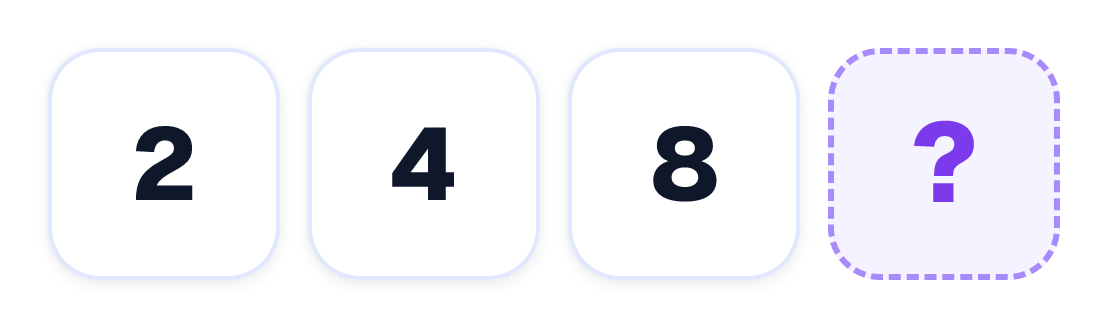
universal.tiles숫자 타일
수열, 합, 방정식을 또렷한 타일로 배치합니다.
{
  "templateId": "universal.tiles",
  "data": {
    "rows": [
      [
        "2",
        "4",
        "8",
        "?"
      ]
    ]
  }
}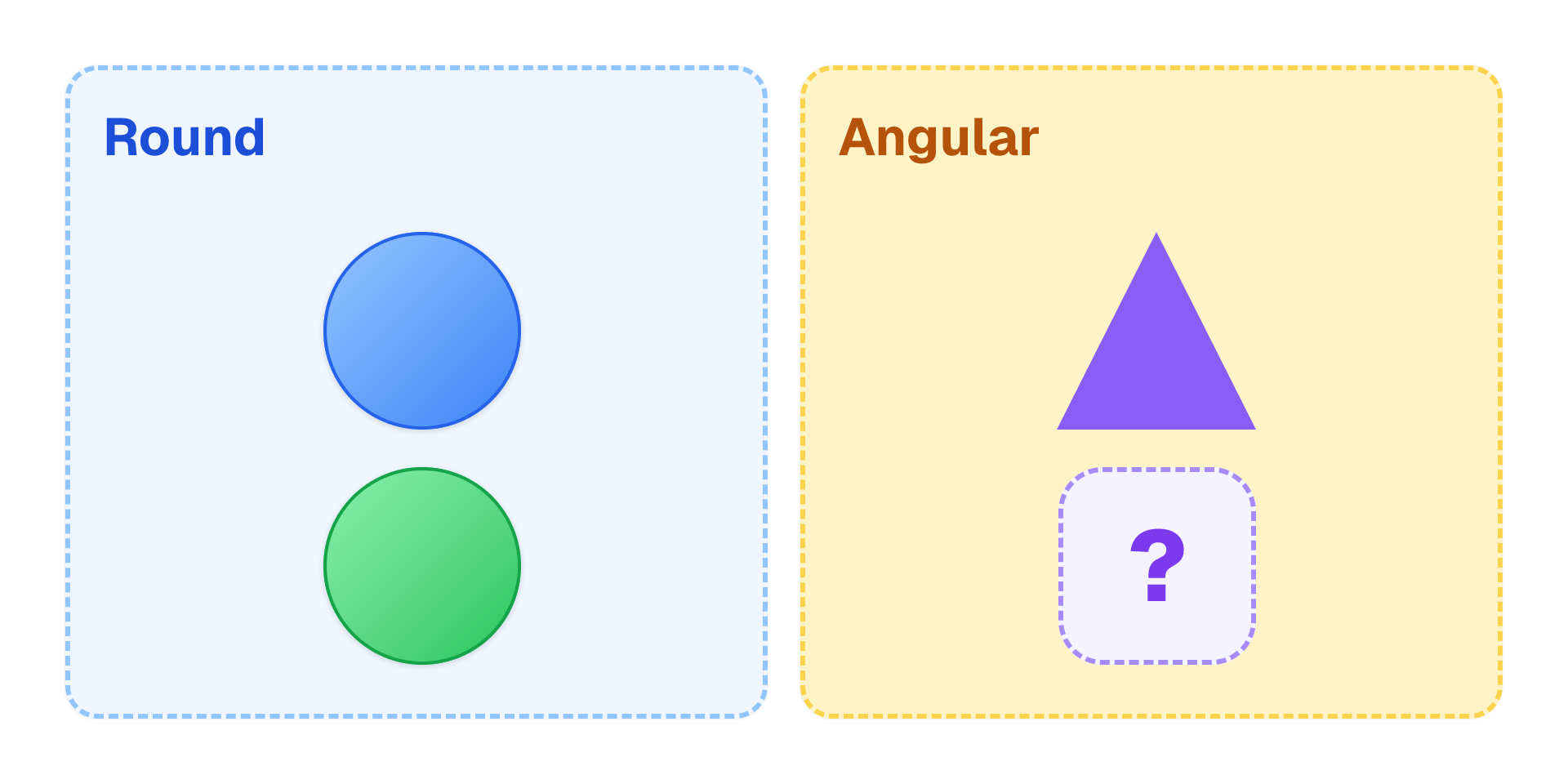
universal.sortingBins분류 상자
라벨이 붙은 칸에 항목을 넣습니다.
{
  "templateId": "universal.sortingBins",
  "data": {
    "bins": [
      "Round",
      "Angular"
    ],
    "binItems": [
      [
        {
          "kind": "shape",
          "name": "circle"
        },
        {
          "kind": "shape",
          "name": "triangle"
        }
      ],
      [
        {
          "kind": "shape",
          "name": "circle"
        },
        "?"
      ]
    ]
  }
}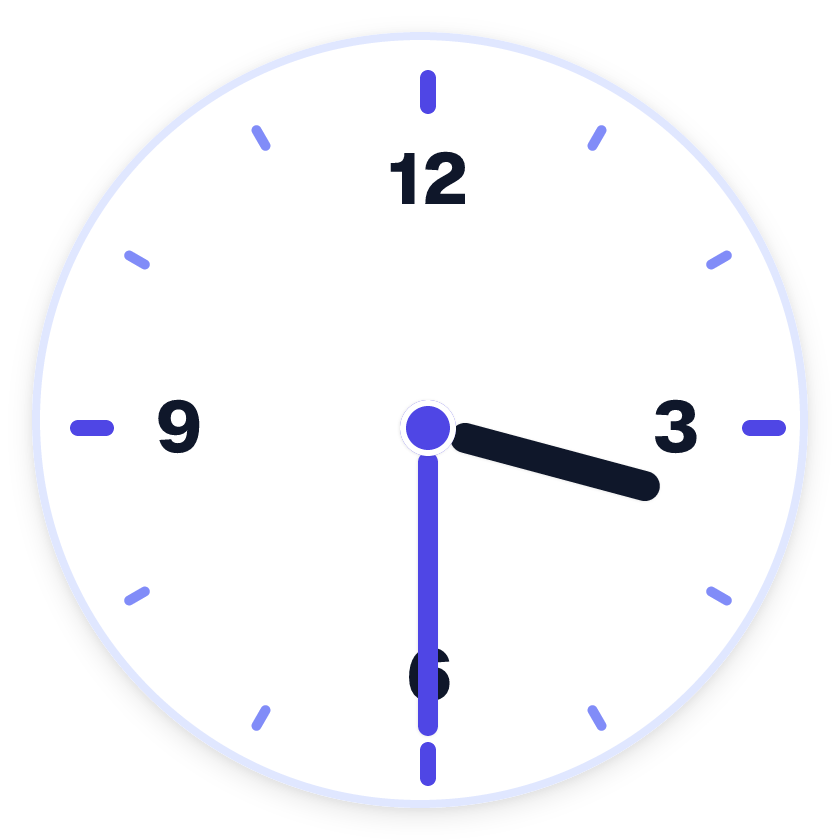
universal.clockFace시계 다이얼
시각 문제용 아날로그 시계.
{
  "templateId": "universal.clockFace",
  "data": {
    "hour": 3,
    "minute": 30
  }
}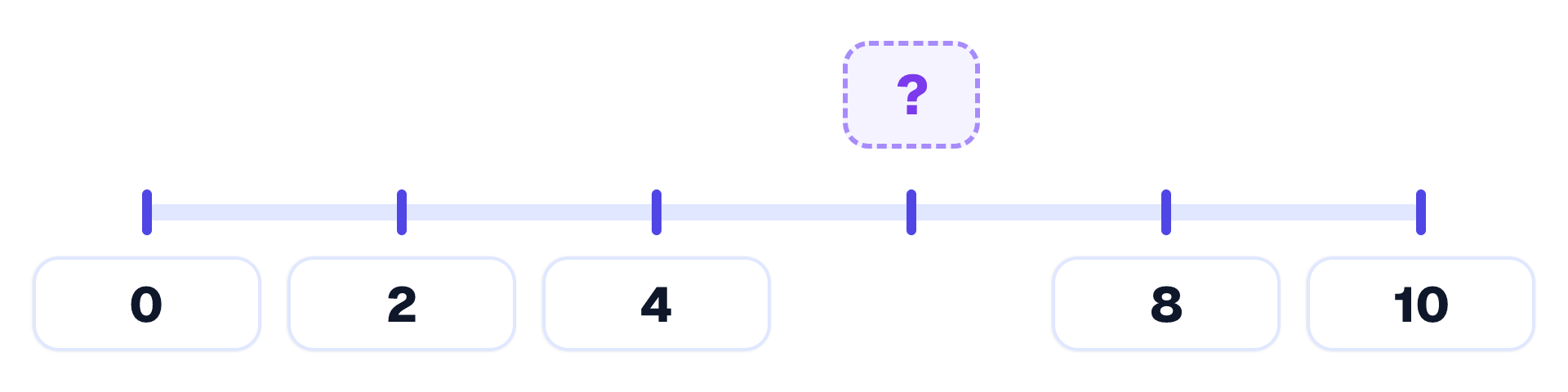
universal.numberLine수직선
빈칸이 있는 세기와 수열.
{
  "templateId": "universal.numberLine",
  "data": {
    "start": 0,
    "end": 10,
    "step": 2,
    "missing": 6
  }
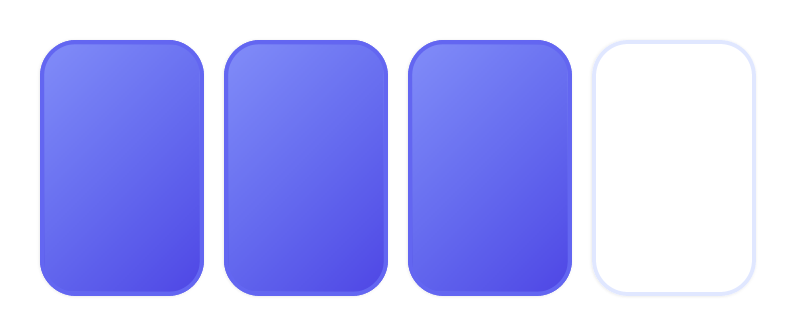
}
math.fractionBar분수 막대
전체에 대한 분수를 보여주는 분할 막대.
{
  "templateId": "math.fractionBar",
  "data": {
    "shaded": 3,
    "total": 4
  }
}
language.sentenceTiles문장 타일
단어 타일로 문장을 만들고, 채울 빈칸이 있습니다.
{
  "templateId": "language.sentenceTiles",
  "data": {
    "words": [
      "The",
      "cat",
      "sat",
      "on",
      "the",
      {
        "kind": "gap",
        "characters": 3
      }
    ]
  }
}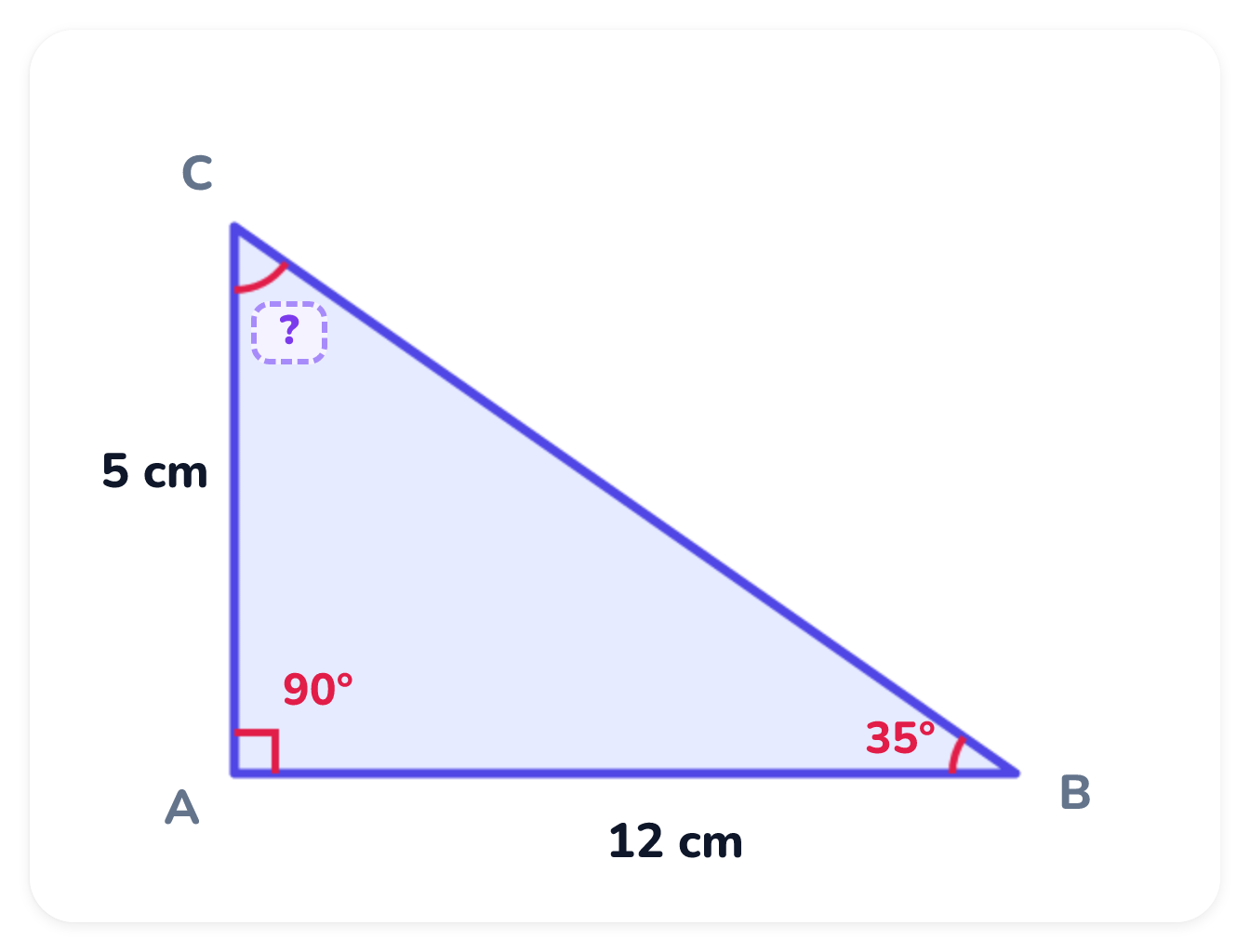
geometry.figure기하 도형
각, 삼각형, 사각형, 원, 평행선에 문제에 필요한 표시를 넣고 구하는 값은 빈칸으로 둡니다.
{
  "templateId": "geometry.figure",
  "data": {
    "kind": "triangle",
    "angles": [
      90,
      35,
      55
    ],
    "angleLabels": [
      "90°",
      "35°",
      "?"
    ],
    "sideLabels": [
      "12 cm",
      null,
      "5 cm"
    ],
    "vertices": [
      "A",
      "B",
      "C"
    ]
  }
}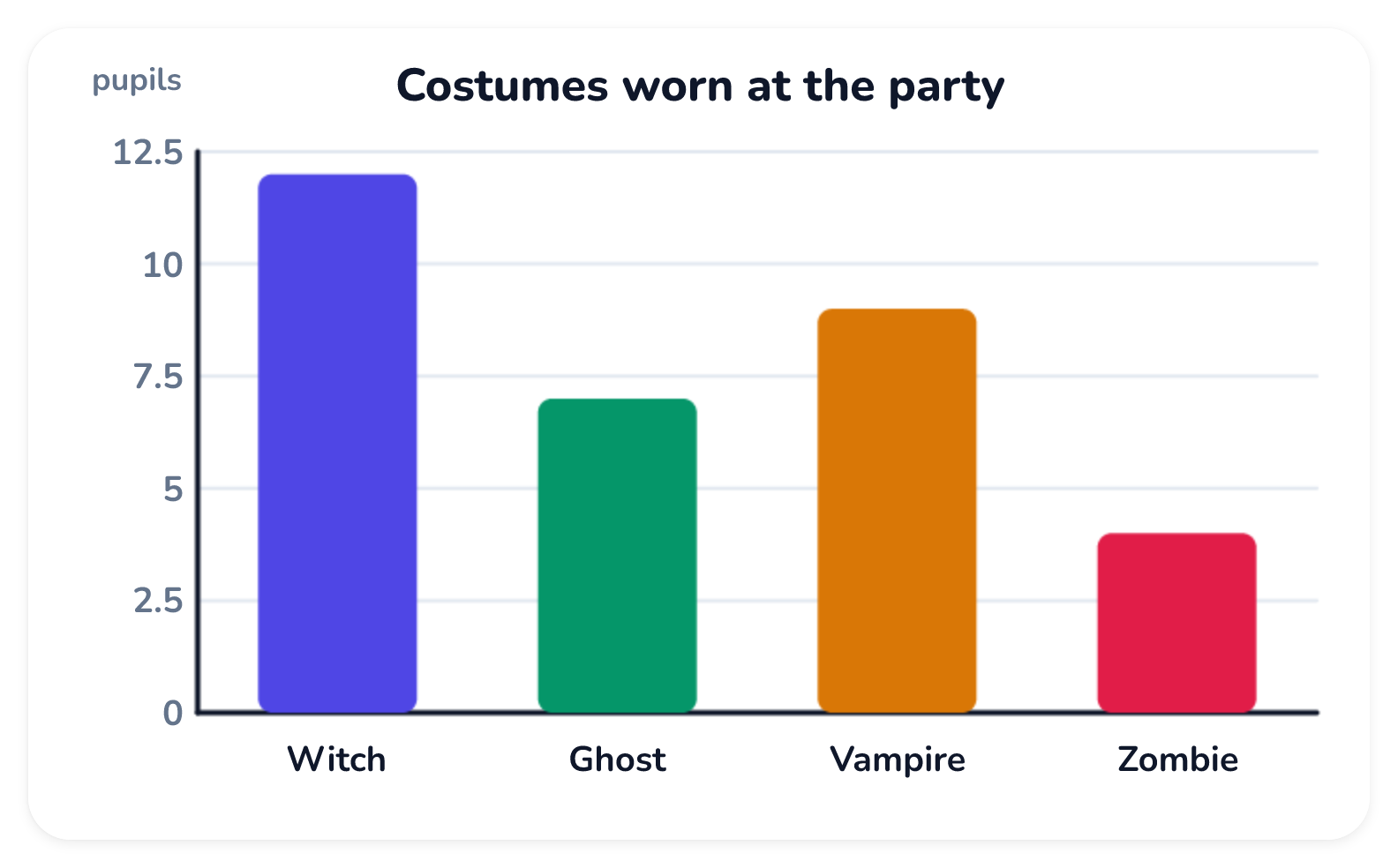
data.barChart막대그래프
눈금선에서 값을 읽거나, 항목을 비교하거나, 합계를 구합니다.
{
  "templateId": "data.barChart",
  "data": {
    "title": "Costumes worn at the party",
    "categories": [
      "Witch",
      "Ghost",
      "Vampire",
      "Zombie"
    ],
    "values": [
      12,
      7,
      9,
      4
    ],
    "unit": "pupils"
  }
}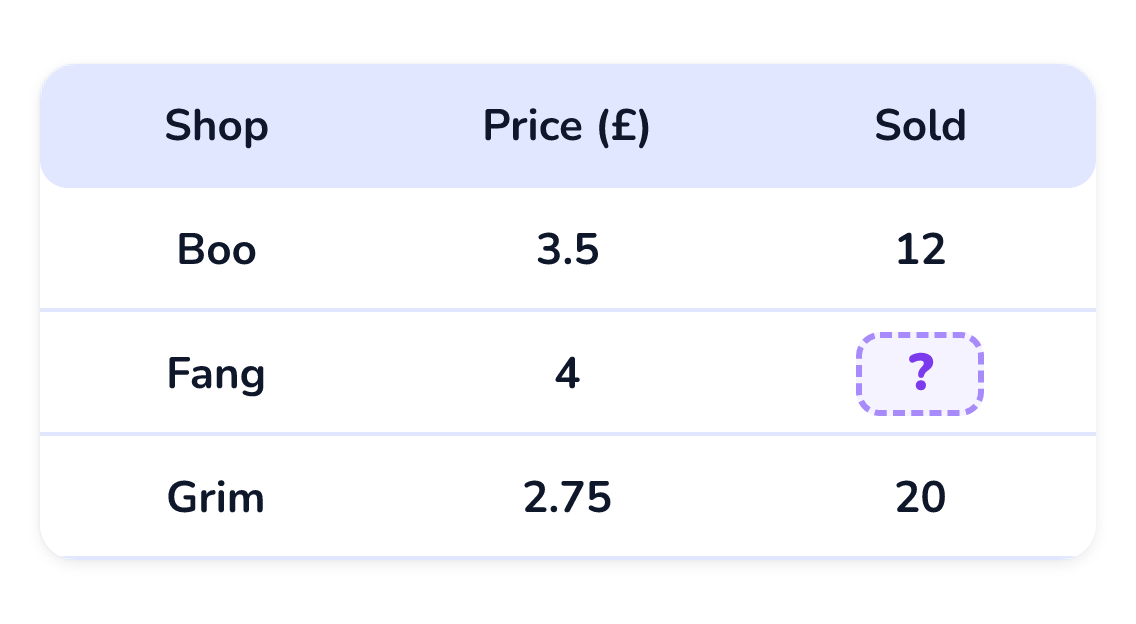
data.table데이터 표
한 칸을 숨긴 작은 표로 "여기에 들어갈 값은?" 문제를 만듭니다.
{
  "templateId": "data.table",
  "data": {
    "headers": [
      "Shop",
      "Price (£)",
      "Sold"
    ],
    "rows": [
      [
        "Boo",
        3.5,
        12
      ],
      [
        "Fang",
        4,
        null
      ],
      [
        "Grim",
        2.75,
        20
      ]
    ]
  }
}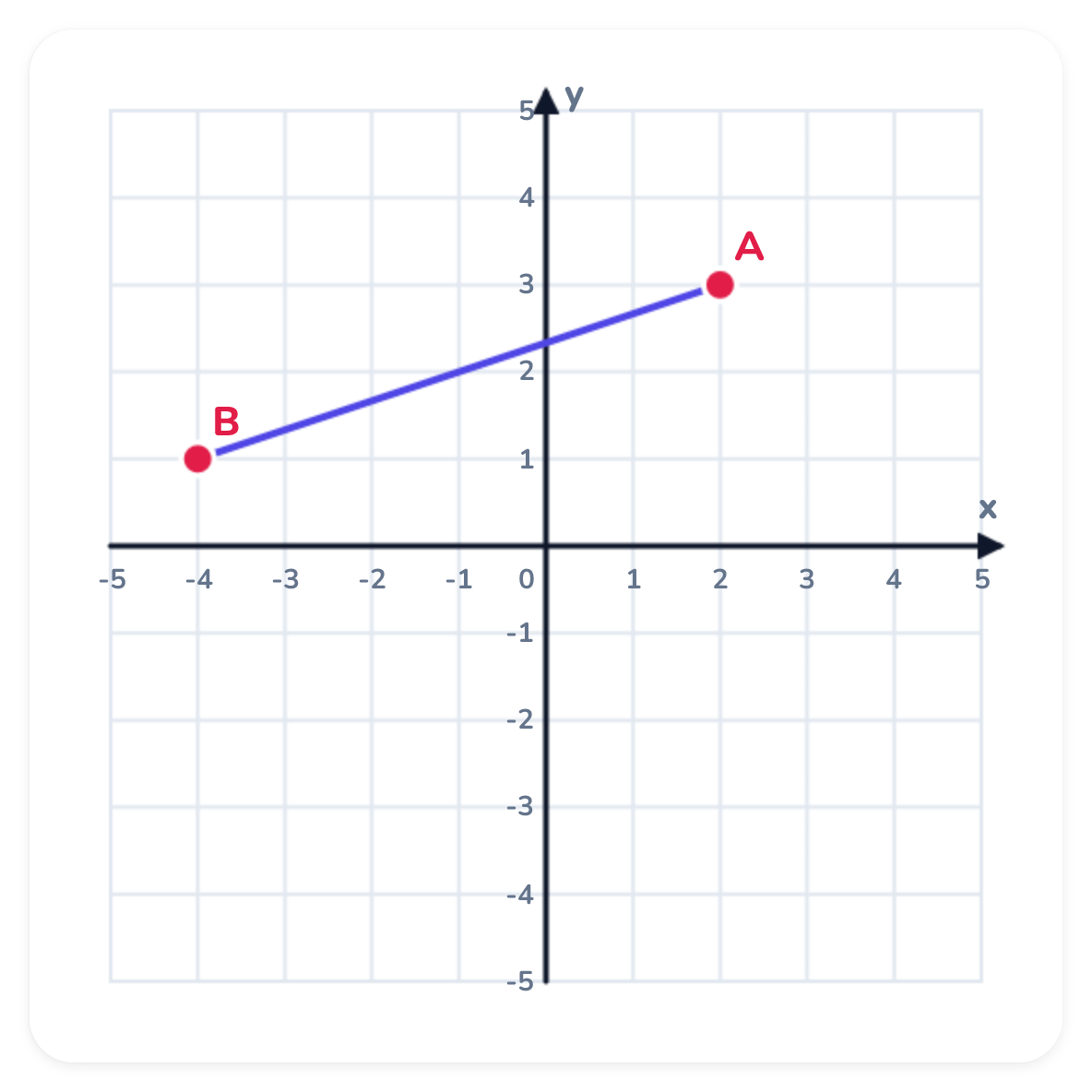
math.coordinateGrid좌표평면
좌표, 중점, 기울기를 위한 점과 선분을 표시합니다.
{
  "templateId": "math.coordinateGrid",
  "data": {
    "xMin": -5,
    "xMax": 5,
    "yMin": -5,
    "yMax": 5,
    "points": [
      {
        "x": 2,
        "y": 3,
        "label": "A"
      },
      {
        "x": -4,
        "y": 1,
        "label": "B"
      }
    ],
    "segments": [
      [
        0,
        1
      ]
    ]
  }
}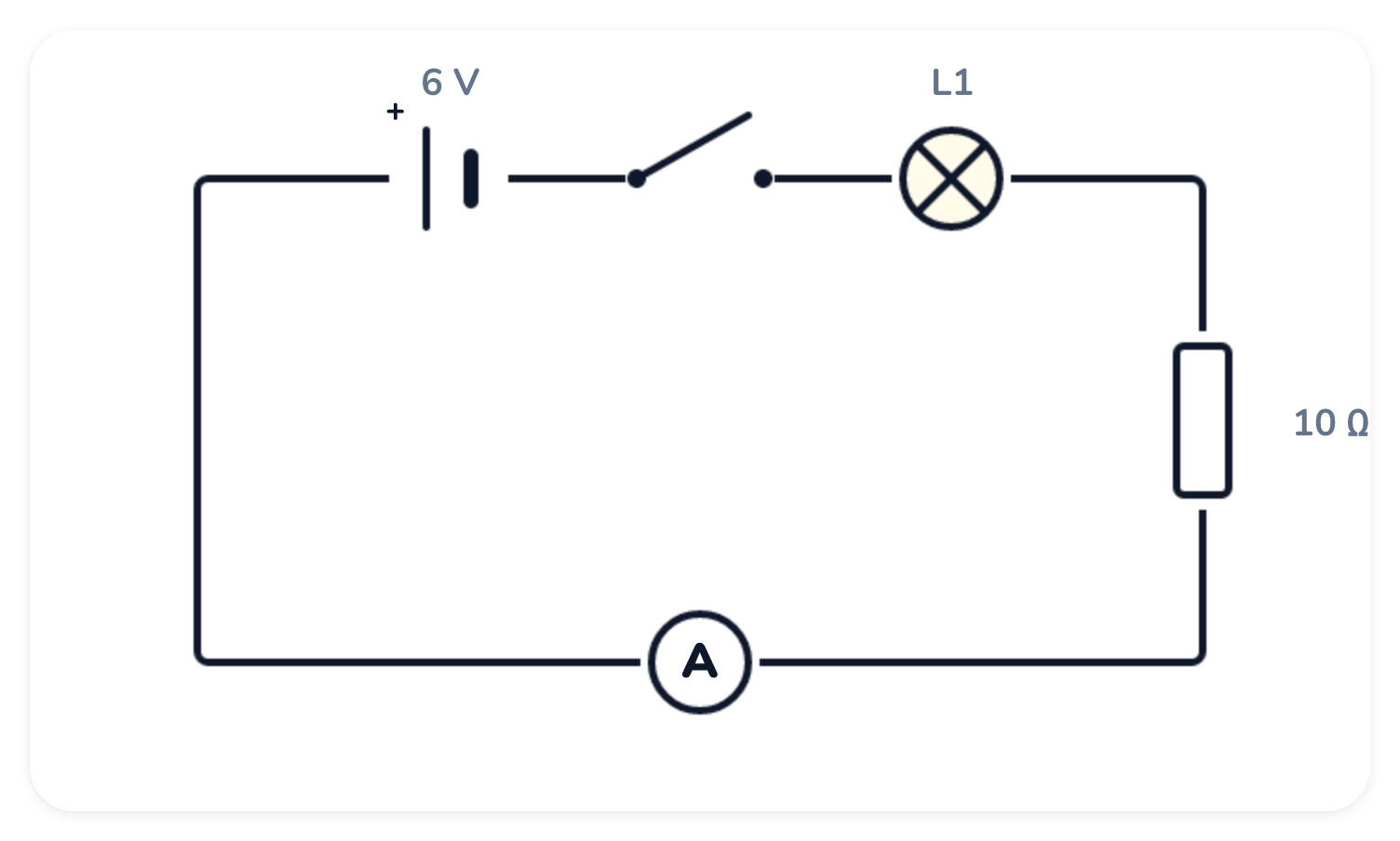
science.circuit회로도
전지, 전구, 저항, 스위치, 계기의 표준 기호로 그린 직렬 회로.
{
  "templateId": "science.circuit",
  "data": {
    "components": [
      {
        "kind": "battery",
        "label": "6 V"
      },
      {
        "kind": "switch",
        "open": true
      },
      {
        "kind": "bulb",
        "label": "L1"
      },
      {
        "kind": "resistor",
        "label": "10 Ω"
      },
      {
        "kind": "ammeter"
      }
    ]
  }
}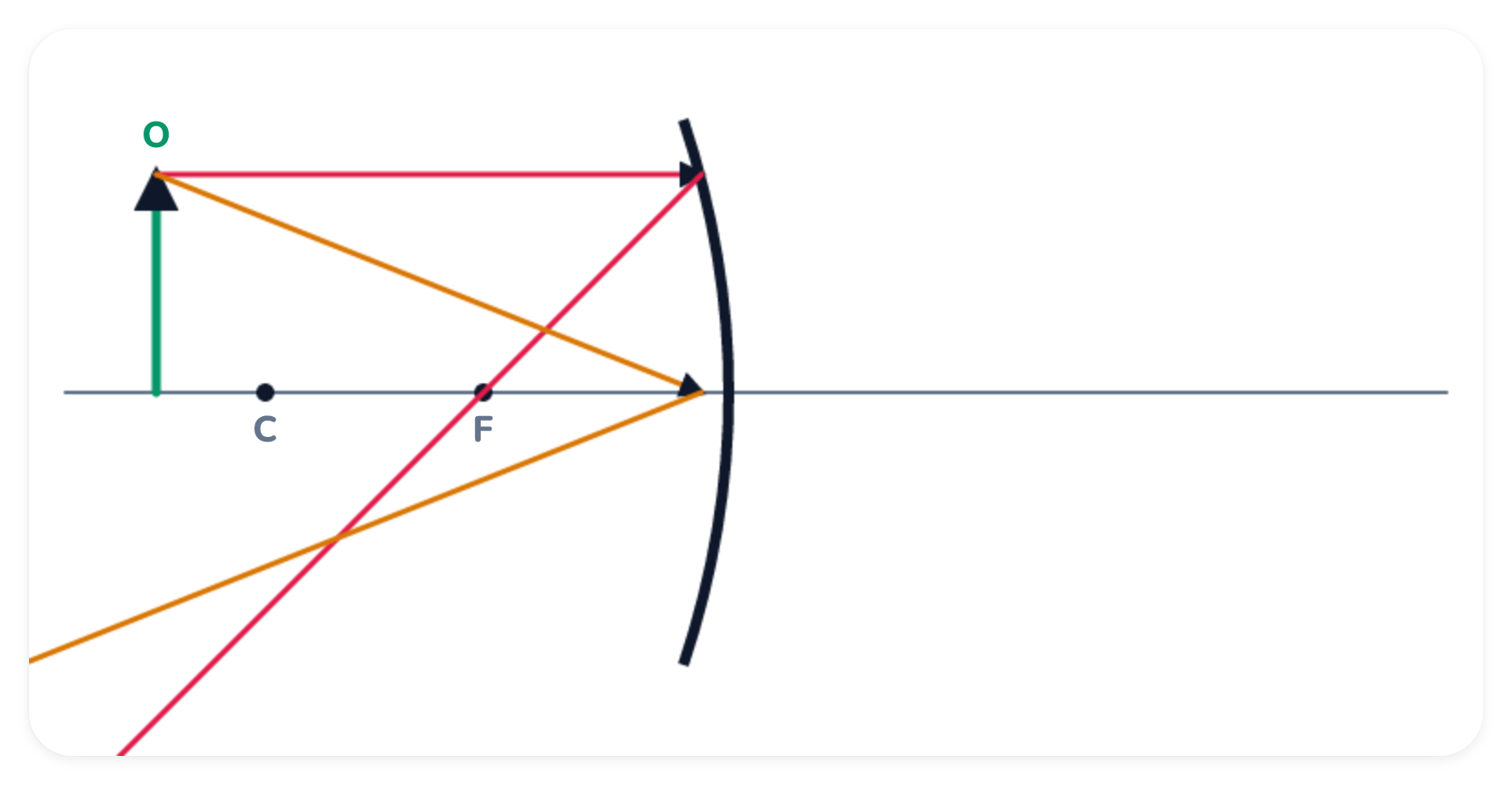
science.rayDiagram광선 작도
거울과 렌즈의 주요 광선; 상이 생기는 위치를 묻거나 상을 보여 줍니다.
{
  "templateId": "science.rayDiagram",
  "data": {
    "device": "concaveMirror",
    "focalLength": 2,
    "objectDistance": 5,
    "objectHeight": 2,
    "showImage": false
  }
}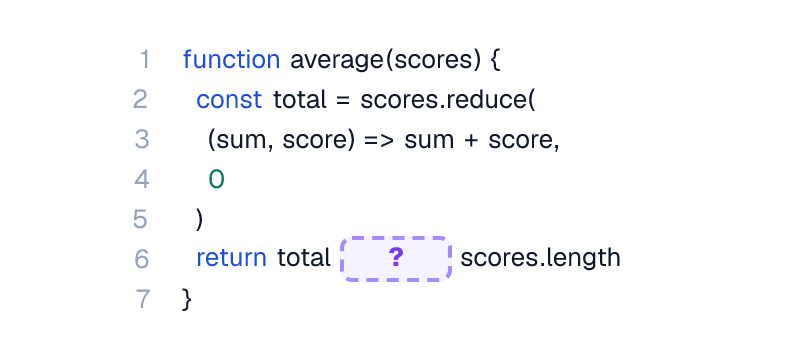
code.fillBlank빈칸 채우기
빠진 부분이 분명히 표시된 코드입니다.
{
  "templateId": "code.fillBlank",
  "data": {
    "code": "function average(scores) {\n  const total = scores.reduce(\n    (sum, score) => sum + score,\n    0\n  )\n  return total ___{1} scores.length\n}",
    "language": "javascript"
  }
}
코드 예제 더 보기
code.fillBlank는 30줄, 최대 2,000자까지입니다. ___만 쓰면 기본 빈칸 너비입니다. ___{N}은 빈칸을 N자 너비로 하며, N은 1에서 24입니다. JavaScript, Python, HTML, SQL이 됩니다.
JavaScript

{
  "templateId": "code.fillBlank",
  "data": {
    "code": "async function loadQuiz(id) {\n  const response = await fetch(`/api/quizzes/${id}`)\n  if (!response.ok) {\n    throw new Error(\"Could not load quiz\")\n  }\n  return ___{15}\n}",
    "language": "javascript"
  }
}
Python

{
  "templateId": "code.fillBlank",
  "data": {
    "code": "def average(scores):\n    if not scores:\n        return 0\n\n    total = sum(scores)\n    return total ___{1} len(scores)",
    "language": "python"
  }
}
HTML

{
  "templateId": "code.fillBlank",
  "data": {
    "code": "<figure class=\"quiz-image\">\n  <img\n    src=\"aurora.webp\"\n    ___{3}=\"Northern lights over Tromsø\"\n  />\n  <figcaption>Norway at night</figcaption>\n</figure>",
    "language": "html"
  }
}
SQL

{
  "templateId": "code.fillBlank",
  "data": {
    "code": "SELECT subject, COUNT(*) AS question_count\nFROM questions\nWHERE status = 'published'\nGROUP BY ___{7}\nORDER BY question_count DESC;",
    "language": "sql"
  }
}
타일에 넣을 수 있는 것
글자, 숫자, 빈칸으로 그림을 만듭니다. 이모지, 겹친 이모지, 깃발, 도형, 스타일 텍스트, LaTeX가 됩니다. {"kind":"gap","characters":N}은 글자 또는 타일 빈칸을 N자 너비로 하며, N은 1에서 24입니다. 예전 표시는 기본 너비를 유지합니다.
textnumber?{"kind":"gap","characters":3}emojiemojiStackflagshapelatex